
Filing your first Income Tax Return (ITR) is an important financial milestone. Most first-time taxpayers focus on choosing the correct ITR form, claiming deductions, and submitting the return on time. However, many overlook one equally important aspect—protecting their e-filing account.
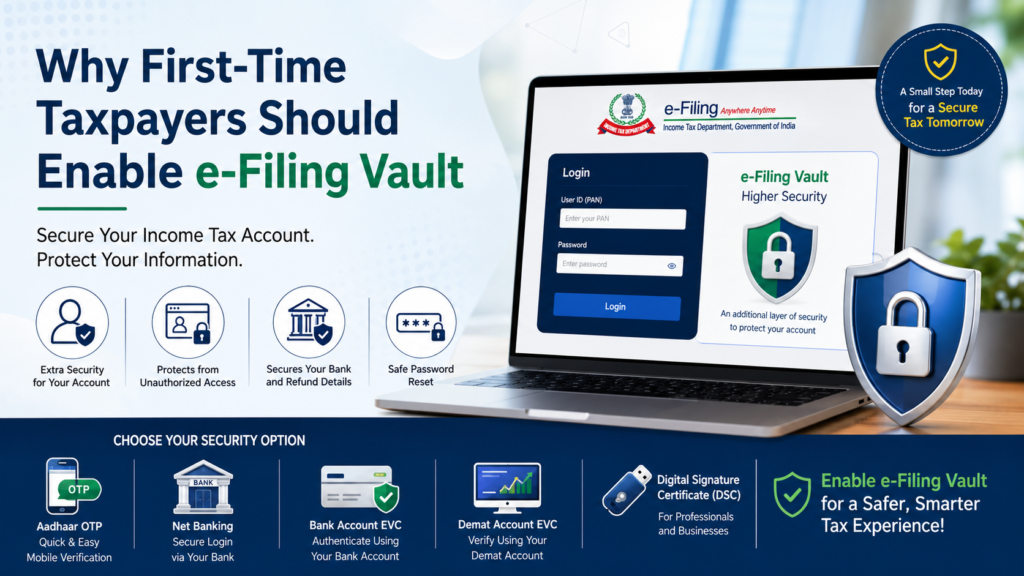
Your Income Tax e-filing account contains sensitive financial information such as PAN details, bank accounts, income records, tax payments, and refund information. To strengthen the security of these details, the Income Tax Department provides an additional protection mechanism called the e-Filing Vault Higher Security facility, also known as e-Vault. Although it is optional, enabling this feature can significantly reduce the risk of unauthorized access to your tax account.
What is the e-Filing Vault Facility?
The e-Filing Vault is a multi-factor authentication system available on the Income Tax e-Filing Portal. It adds a second layer of security over the usual PAN and password combination.
Even if someone obtains your login credentials, they cannot access your account without completing an additional authentication step. The facility can also be applied to password reset requests, thereby protecting your account from fraudulent password changes.
Why Is It Important for First-Time Taxpayers?
Many new taxpayers assume that only high-income individuals are vulnerable to cyber threats. In reality, any tax account can become a target for:
- Unauthorized access.
- Identity theft.
- Fraudulent changes in bank account details.
- False refund claims.
- Illegal password resets.
- Misuse of personal and financial information.
Since first-time taxpayers may not be familiar with cyber security practices, enabling e-Vault acts as an additional safeguard against such risks.
How Does e-Filing Vault Work?
Normally, logging into the Income Tax Portal requires:
- User ID (PAN)
- Password
With e-Vault enabled, an additional authentication is required before access is granted. This second-factor authentication ensures that even if your password is compromised, your account remains secure.
Security Options Available Under e-Filing Vault
Taxpayers can choose one or more of the following methods:
1. Aadhaar OTP
A one-time password is sent to the mobile number linked with Aadhaar.
Suitable for:
- Salaried individuals.
- First-time taxpayers.
- Users who prefer mobile-based authentication.
2. Net Banking Authentication
Login is completed through your registered net banking account.
Suitable for:
- Individuals frequently using internet banking.
- Professionals and business owners.
3. Bank Account EVC
Authentication is done through an Electronic Verification Code generated from a pre-validated bank account.
Suitable for:
- Taxpayers having linked bank accounts.
4. Demat Account EVC
Authentication is performed through a pre-validated Demat account.
Suitable for:
- Investors in shares and securities.
5. Digital Signature Certificate (DSC)
This method uses a registered digital signature for authentication.
Suitable for:
- Companies.
- LLPs.
- Professionals regularly filing statutory forms.
These options can be used both for login and password reset security.
Benefits of Enabling e-Filing Vault
Enhanced Account Security
An extra authentication layer makes unauthorized access extremely difficult.
Protection Against Password Theft
Even if someone knows your PAN and password, they cannot log in without completing the second verification process.
Secure Password Reset
Fraudulent password changes are prevented through additional authentication.
Safety of Refund Details
Bank account information used for receiving tax refunds remains protected.
Reduced Risk of Identity Fraud
Sensitive financial information remains secure from cyber criminals.
Peace of Mind
Knowing that your tax records are protected allows you to file returns with greater confidence.
How to Enable e-Filing Vault on the Income Tax Portal
Follow these simple steps:
Step 1: Login
Visit the Income Tax e-Filing Portal and log in with your PAN and password.
Step 2: Open My Profile
Click on My Profile from the dashboard.
Step 3: Select “e-Filing Vault Higher Security”
Navigate to the e-Filing Vault section.
Step 4: Choose Security Method
Select one or more options for:
- Login security.
- Password reset security.
Options include:
- Aadhaar OTP
- Net Banking
- Bank Account EVC
- Demat Account EVC
- DSC
Step 5: Validate
Complete the required authentication process.
Step 6: Confirm
After successful validation, the selected security mechanism becomes active.
Can Multiple Security Methods Be Selected?
Yes.
Taxpayers can enable multiple methods simultaneously. During login or password reset, they may use any one of the selected authentication methods.
Is e-Filing Vault Mandatory?
No.
The facility is optional. Taxpayers can continue using standard login methods without enabling e-Vault.
However, the Income Tax Department recommends using this feature to improve account security.
Who Should Definitely Enable e-Vault?
The feature is highly recommended for:
- First-time taxpayers.
- Salaried employees.
- Freelancers and professionals.
- Senior citizens filing online.
- Investors having Demat accounts.
- Individuals claiming large tax refunds.
- Business owners and consultants.
- Taxpayers frequently accessing the portal from multiple devices.
Frequently Asked Questions (FAQs)
What is e-Filing Vault Higher Security?
It is a two-factor authentication facility provided by the Income Tax Department that adds extra protection to login and password reset processes.
Is e-Vault compulsory?
No. It is optional, though strongly recommended.
Can I disable e-Filing Vault later?
Yes. The higher security options can be removed anytime through the profile settings.
Which security method is best for first-time taxpayers?
Aadhaar OTP is generally the simplest and most convenient option.
Can multiple security methods be enabled?
Yes. Taxpayers may activate multiple options and use any one of them when required.
Does e-Vault protect password reset requests?
Yes. The feature can be enabled separately for password resets, preventing unauthorized changes.
Is there any charge for using e-Filing Vault?
No. The facility is provided free of cost by the Income Tax Department.
Conclusion
Cybersecurity is becoming increasingly important as tax compliance moves completely online. For first-time taxpayers, securing the Income Tax account should be treated with the same importance as filing the return itself. The e-Filing Vault Higher Security facility provides a simple yet effective way to safeguard personal and financial information against unauthorized access and fraud.
Enabling this feature takes only a few minutes but can provide long-term protection and peace of mind while managing your tax affairs.